Want to monitor your website’s health and improve your Google ranking? Then this Google Search Console Guide is for you! Whether you’re a local shop owner in Odisha or a digital marketer, this free tool can completely transform your SEO game.
In this comprehensive guide, I’ll teach you step-by-step how to use Google Search Console (GSC) to maximize your online visibility. Let’s dive in!
What is Google Search Console?
Google Search Console is a powerful, FREE tool that Google provides for website owners. It shows you:
- How your website performs in Google search
- Which keywords are bringing traffic
- Any technical issues present
- How many pages are indexed
- Your website speed
In simple words – it’s a direct communication channel between your website and Google!
Why Every Business Needs GSC (Especially Local Businesses)
If you run a local shop in Odisha or provide any service, GSC will tell you:
✅ Which areas people are searching from ✅ Which products/services your website is showing up for ✅ How fast your site is on mobile ✅ Whether Google can see your new pages
Real Talk: I had a client – a small bakery in Bhubaneswar. They started using GSC and their online orders tripled in 2 months. How? They discovered people were searching for “midnight cake delivery Bhubaneswar” and created a dedicated page for it!
Setting Up Google Search Console – Step by Step
Step 1: Create Your Account
- Go to search.google.com/search-console
- Sign in with your Google account
- Click “Add Property”
Step 2: Verify Your Website
You have two options:
Option 1: Domain Property (Recommended)
- Verifies entire domain (http, https, all subdomains)
- You’ll need to add DNS record in your hosting provider
- Slightly technical but gives better coverage
Option 2: URL Prefix
- Only verifies specific URL pattern
- Much easier
- You can verify by uploading HTML file or adding meta tag
Pro Tip for Beginners: If you’re doing this for the first time, start with URL Prefix using HTML file upload method. It’s easier!
Step 3: Add Your Sitemap
A sitemap is basically your website’s roadmap. It tells Google which pages exist on your website.
- Go to “Sitemaps” section in GSC
- Add your sitemap URL (usually yoursite.com/sitemap.xml)
- Click Submit
WordPress Users: Yoast SEO or Rank Math plugin automatically creates sitemaps!
Understanding the Google Search Console Dashboard
This is the most important part of this Google Search Console Guide – understanding the dashboard.
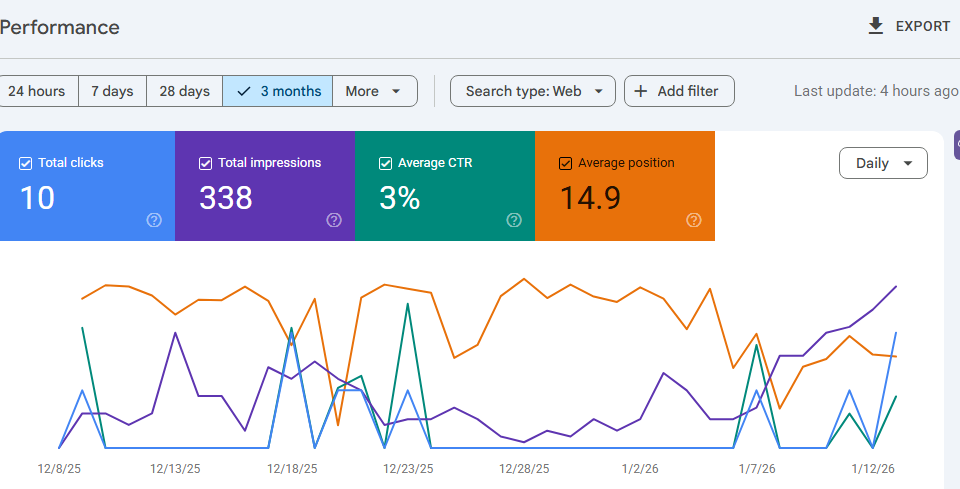
1. Performance Report – Your Traffic Goldmine
This report shows you:
- Clicks: How many people clicked on your website
- Impressions: How many times your site appeared in search results
- CTR (Click Through Rate): What percentage of impressions resulted in clicks
- Average Position: Your average ranking position
How to Use This Data:
Example: If you see that for “best photography services Cuttack” you’re at position 8 with 500 impressions but only 20 clicks, then:
- Improve your title tag
- Make meta description more attractive
- Target featured snippets
2. URL Inspection Tool – Your Page Doctor
To check any specific page:
- Enter URL in top search bar
- Click “Test Live URL”
- See how Google views your page
This tool will tell you:
- Whether the page is indexed
- Any crawling errors
- If it’s mobile-friendly
- Page speed performance
3. Coverage Report – Find Hidden Issues
This report shows:
- How many pages are successfully indexed (Green = Good)
- How many pages have errors (Red = Needs Attention)
- How many pages have valid warnings (Yellow = Check This)
- How many pages are excluded (Gray = May or May Not Be Issue)
Common Issues You’ll Find:
❌ “Crawled – Currently Not Indexed” Solution: Improve content quality, add internal linking
❌ “404 Error” Solution: Fix broken links or add proper 301 redirects
❌ “Duplicate Content” Solution: Use canonical tags
4. Core Web Vitals – Speed Matters!
Google now uses speed as a ranking factor. Core Web Vitals measures three things:
- LCP (Largest Contentful Paint): How quickly main content loads
- Good: Less than 2.5 seconds
- Improve: Compress images, use better hosting
- FID (First Input Delay): How quickly page responds to user clicks
- Good: Less than 100ms
- Improve: Optimize JavaScript
- CLS (Cumulative Layout Shift): How much layout shifts while loading
- Good: Less than 0.1
- Improve: Give images proper size attributes
Real Example: One of my client’s e-commerce sites had LCP of 5 seconds. We compressed images and used CDN – LCP came down to 1.8 seconds. Result? Conversion rate increased by 15%!
Advanced GSC Tricks for Business Growth
In this Google Search Console Guide, I’ll now share some pro-level strategies:
1. Finding “Quick Win” Keywords
This technique is GOLD!
Steps:
- Go to Performance Report
- Apply “Position” filter: between 5-15
- Look for keywords with high impressions
- Improve your content for these keywords
Why This Works: Position 5-15 means you’re already on Google’s first 2 pages. A little improvement and you can reach top 3 – where REAL traffic is!
2. Seasonal Opportunity Spotting
Use filters to see which keywords perform in which months/weeks.
Example: If you sell flowers, then:
- Analyze Valentine’s Week data
- Plan advance for next year
- Prepare content 2-3 months ahead
3. Competitor Analysis (Indirect)
GSC doesn’t directly show competitors, but smart people use it like this:
- See which unexpected keywords are bringing traffic
- Search those keywords on Google
- See what competitors are doing
- Create better content
4. Mobile vs Desktop Performance
India has more mobile users, so always compare:
- Check mobile and desktop data separately
- Identify device-specific issues
- Create mobile-first strategy
Common Mistakes to Avoid
❌ Setting up GSC and forgetting about it: Check monthly, watch trends
❌ Only looking at clicks: CTR, position, impressions – all are important
❌ Ignoring technical errors: Small errors can become big problems
❌ Not updating sitemap: When you add new pages, resubmit sitemap
❌ Ignoring mobile issues: 70%+ of Indian traffic comes from mobile!
Integrating GSC with Other Tools
GSC alone is powerful, but combine it with other tools and magic happens:
GSC + Google Analytics:
- Complete user behavior understanding
- Conversion tracking with search data
GSC + AI Tools:
- Faster content gap analysis
- Automated reporting
- Predictive insights
GSC + Social Media:
- Identify trending topics
- Content calendar planning
- Engagement optimization
Action Plan for Beginners
Week 1:
- Set up and verify GSC
- Submit sitemap
- Explore dashboard
Week 2:
- Check performance report daily
- Identify 5-10 “quick win” keywords
- Look for errors in coverage report
Week 3:
- Fix errors
- Check Core Web Vitals
- Start speed optimization
Week 4:
- Optimize content based on data
- Improve mobile friendliness
- Create first month’s report
GSC for Different Business Types
For Local Shops/Stores:
- Track local keywords
- Monitor “near me” searches
- Link Google My Business
For Service Providers:
- Track service-specific landing pages
- Analyze query variations
- Identify seasonal patterns
For E-commerce:
- Check product page performance
- Optimize category pages
- Target shopping queries
For Bloggers/Content Creators:
- Identify top performing content
- Find content gaps
- Target featured snippets
Future of GSC and AI Integration
In 2026, GSC is becoming even more powerful with:
- AI-powered insights
- Predictive analytics
- Voice search data
- Video content tracking
- Better mobile app support
My Prediction: Businesses that seriously use GSC now will be far ahead of their competitors in the next 2 years!
Final Thoughts
After reading this Google Search Console Guide, you should understand that GSC isn’t just a tool – it’s the foundation of your digital success.
Remember:
✅ Monitor regularly
✅ Make data-driven decisions
✅ Fix technical issues immediately
✅ Continuously improve content
✅ Keep mobile-first approach
Need Help?
If you need help with GSC setup or SEO strategy, feel free to reach out:
📧 Contact: @its_ayushmman (Instagram) 💰 Services: Starting from just ₹1,000 🎯 Expertise: AI-powered digital marketing solutions
Special Offer: FREE GSC audit for first-time clients!
Pro Tip: Bookmark this Google Search Console Guide and refer to it every month. GSC constantly updates, so I’ll also regularly update this guide with latest features and strategies.
Action Step: Right now, this minute, open your GSC account and do a quick check. In just 5 minutes you’ll know what your website needs!
Remember – Data is the new gold, and Google Search Console is your free goldmine!
Happy Optimizing! 🚀
Thanks for this valuable information.
Nice information thankyou.
Wow this is very helpful guide thanks to the author